Compare
Looking for a Flair AI alternative?
Flair gives you a canvas: you place the props, you build the set, you control the composition. Cheeppy gives you the finished set: a Recipe our creators already composed, into which your product drops. One rewards a designer; the other removes the need for one.
Orientation
Two tools, two jobs.
Their focus
Flair AI
A design tool for product photoshoots: build the set yourself on a drag-and-drop AI canvas.
Cheeppy
Cheeppy
A product studio: you upload one product photo, pick a Recipe — a scene built by our creators, with its light, framing and pose — and the product is placed in it. Then you re-shoot that result from new angles, put it in every format, make a short film of it, and send it to your store. There is no canvas and nothing to compose — that is the point.
How they work
Where Flair AI and Cheeppy differ.
The axis that matters is how much of the set you want to build yourself.
| Flair AI | Cheeppy | |
|---|---|---|
| Building the scene | A drag-and-drop canvas: place props, arrange the set, control the composition. | A Recipe: the set is already built, with its light, framing and pose. |
| Skill assumed | Design judgement — you are art-directing. | None. Choosing between finished photographs. |
| Collaboration | Several people on the same canvas in real time. | One account, one library; the shared layer is the Recipe catalog. |
| After the first image | Re-arrange the canvas and regenerate. | Photoshoot re-shoots the kept image from a new angle without touching the scene. |
| Store workflow | Web, with API access on higher plans. | Connect Shopify, WooCommerce or Wix and send the finished image back to the listing. |
Building the scene
- Flair AI
- A drag-and-drop canvas: place props, arrange the set, control the composition.
- Cheeppy
- A Recipe: the set is already built, with its light, framing and pose.
Skill assumed
- Flair AI
- Design judgement — you are art-directing.
- Cheeppy
- None. Choosing between finished photographs.
Collaboration
- Flair AI
- Several people on the same canvas in real time.
- Cheeppy
- One account, one library; the shared layer is the Recipe catalog.
After the first image
- Flair AI
- Re-arrange the canvas and regenerate.
- Cheeppy
- Photoshoot re-shoots the kept image from a new angle without touching the scene.
Store workflow
- Flair AI
- Web, with API access on higher plans.
- Cheeppy
- Connect Shopify, WooCommerce or Wix and send the finished image back to the listing.
The difference
What Cheeppy does differently.
No set to build
The composition is the part most sellers do not want to do. A Recipe hands it over finished.
The product is reproduced from your photo
Not described, not redrawn — placed.
Angles instead of re-staging
Keep the result, change the camera: closer, three-quarter, low, macro.
Our creators build the missing scene
If nothing fits, they compose one around your product — and it stays yours to re-run.
Honestly
When Flair AI is the better fit.
No tool wins every row. Here is where Flair AI is the sensible choice.
Pick Flair AI if
you have a designer who wants to place props and control the set
Pick Flair AI if
several people need to work on the same scene at once
Pick Flair AI if
you want a custom trained model and enterprise API access
Proof
What Cheeppy produces.
Nothing composed by hand: a Recipe, a product, a result.
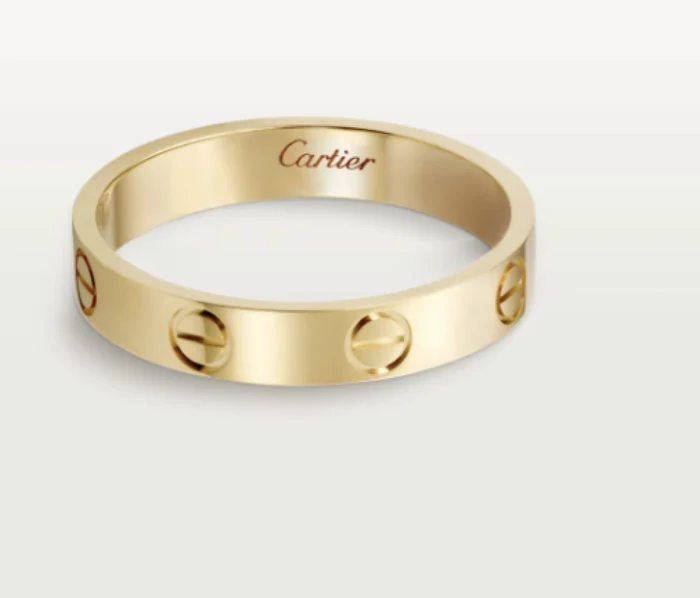
Your photo 
Generated 
Another Recipe 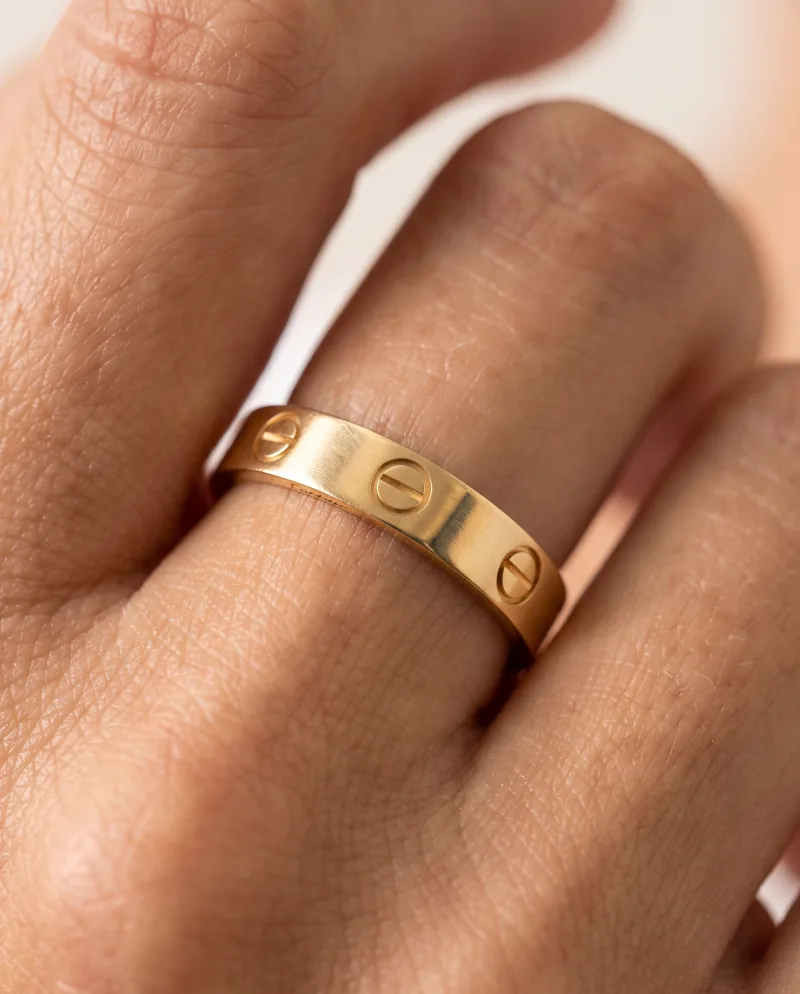
Re-shot closer
Pricing
What each one costs.
Flair AI
Their pricing is not quoted here — check Flair AI’s current pricing on their site, it changes more often than a comparison page does.
Cheeppy
Paid plans from $20/mo, and up to 100 free credits to try first — no card. You own what you generate, on every plan.
FAQ
Questions
- Can I control the composition in Cheeppy?
- Not as a canvas. You choose the Recipe, the format, the backdrop colour on compatible Recipes and the cast model — the framing belongs to the Recipe.
- What if no Recipe fits my brand?
- Ask for a Custom Recipe: our creators build the scene around your product, and it lands in your account.
- Is there an API?
- No. Cheeppy is used in the web app and the iPhone app.
Sources
What this page says about Flair AI comes from their own site, checked on : flair.ai · flair.ai/pricing. Products change — check theirs before you decide.
See a finished scene with your product in it.
Up to 100 free credits, no card. Try it with your own product and compare the result, not the feature list.